
Monday, September 28, 2026
Home Blog Page 7235

WATCH: Anushka Sharma And Sanjana Ganesan’s Priceless Reaction To Mitchell Starc’s Wicket Goes Viral!

0
WATCH: Anushka Sharma And Sanjana Ganesan’s Priceless Reaction To Mitchell Starc’s Wicket Goes Viral!


New Delhi: The first match of the Border-Gavaskar Trophy saw India take a commanding lead over Australia in Perth. Despite being bowled out for a modest 150 in the first innings, the Indian team bounced back spectacularly, dismissing Australia for just 104 runs. Jasprit Bumrah’s side gained a 46-run lead as the Aussies registered their third-lowest home ground score since 2000.

The high-octane match had several notable spectators, including Virat Kohli’s wife and Bollywood actress Anushka Sharma, along with acting captain Jasprit Bumrah’s wife and sports presenter Sanjana Ganesan. Their presence in the stands added an extra spark to the intense cricketing action.

On Saturday, November 23, Australia resumed their innings from 67/7, aiming to salvage what they could. The Indian bowlers were determined to end the innings quickly, securing two swift dismissals. However, Australia’s Mitchell Starc and Josh Hazlewood dug in, frustrating Team India with a resolute 25-run stand off 110 balls for the last wicket.

The partnership tested the patience of the Indian team and fans alike, with the game hanging in the balance. When India finally managed to dismiss Mitchell Starc, the stadium erupted in celebration. Among the cheering crowd, the reactions of Anushka Sharma and Sanjana Ganesan stood out.

The two were caught on camera celebrating the wicket with expressions of joy and relief. Their spontaneous reactions instantly went viral across social media platforms. Fans couldn’t get enough of their infectious energy, dubbing their moment as “worth crores” in priceless entertainment value.

The clip of their reactions has since flooded Twitter and Instagram, drawing admiration from cricket enthusiasts and casual viewers alike. Have a look at the video:


Anushka Sharma, married to cricketing superstar Virat Kohli, tied the knot in a private ceremony in Italy in 2017. The couple welcomed their first child, a daughter named Vamika, in 2021, followed by their second child, a son named Akaay, in 2024.

On the work front, Anushka, who last appeared in the Shah Rukh Khan-starrer Zero, is gearing up for her next big project, Chakda Xpress. In this biopic, she will portray legendary Indian cricketer Jhulan Goswami. The film, directed by Prosit Roy, is produced by her brother Karnesh Sharma under their home banner.


Shortcut Keys for Shutdown: How to Shutdown PC or Laptop Using Keyboard

0
Shortcut Keys for Shutdown: How to Shutdown PC or Laptop Using Keyboard


There is always a time when you just want to turn off your computer quickly. Although the conventional way requires a lot of steps, what if we told you that you can easily shut down your PC or laptop by using different key combinations? Yes, there are several convenient ways to do this. This guide will walk you through different shortcut keys to shut down your Windows or Mac-based laptop or PC. So, without further ado, let’s get started.  

Shortcut Keys to Shutdown Windows Laptop or PC

Here are different ways to shut down your Windows-based laptop or PC using the shortcut keys below. 

Alt + F4 Method

This is the first and simplest shortcut key for shutting down a Windows PC or laptop. Here’s what you need to do. 

Step 1: Enter Alt + F4 on your keyboard from your Windows screen. 

Step 2: You will see a ‘Shut Down Windows’ dialogue. 

Step 3: Select ‘Shut down’ from the drop menu and select OK.

Alt + Ctrl + Del Method

Another method to shut down your Windows laptop is using this combo. Here’s how to do it: 

Step 1: Close all the Windows on your computer. 

Step 2: Press the Alt + Ctrl + Del combination on your keyboard. 

Step 3: From the screen, select the Sign Out option. 

With this, your laptop or PC will be shut down automatically. 

Win + X Method 

Win + X is yet another convenient way to shut down your computer easily. Here’s how you can do it: 

Step 1: From the Windows screen, Press Win + X on your keyboard. 

Step 2: Press U to open the Shut Down or Sign Out section. 

Step 3: Press U again to shut down your Windows laptop or PC. 

Shortcut Keys to Shutdown Mac Laptop or PC 

Mac OS only allows a specific set of keyboard shortcut keys to shut down the system. Here’s what you need to know. 

Cmd + Option + Control + Power Method 

The only way to shut down a Mac laptop or PC by keyboard is by entering the following command: Cmd + Option + Ctrl + Power menu. When you press all of these buttons together, the Mac will close all the applications, and the laptop will shut down.  

How to Shutdown Laptop or PC without using Shortcut Keys 

There are also different ways to shut down your Windows PC or laptop easily. This section will describe four different ways to do so quickly. 

Shutdown Laptop or PC via Run Dialogue 

You can use the Run programme to shutdown your PC. Here’s how: 

Step 1: Press Win + R to open the Run dialogue box. 

Step 2: Now enter “ Shutdown –s ” and hit Enter. 

An alert will appear on your screen to tell you that the computer is about to shut down. 

Shutdown Laptop or PC via Command Prompt 

One can also use the command prompt to shut down any Windows laptop or PC. In order to do this, follow these steps: 

Step 1: Press Win + R to open the Run programme. 

Step 2: Now, type “cmd” in the box and then click on Enter. 

Step 3: In the command prompt window, enter the following command: shutdown/s

Step 4: Tap on Enter, and your laptop will shut down. 

Shutdown Laptop or PC by Creating a Shortcut 

Windows also gives you an option to create shortcuts to perform different functions on your laptop or computer. One can also create a shortcut for shutting down a laptop or PC. Here’s how you can do it. 

Step 1: Right-click on the home screen section on your Windows laptop. 

Step 2: Go to New and then click on the Shortcut option. 

Step 3: In the box, enter the following command: shutdown.exe -s -t 00 –f

Step 4: Click on Next to create the shortcut. 

Once you double-click on the icon, the computer will shut down automatically. Interestingly, you can also use this shortcut to create a personalised shortcut key to shut down your computer. Here’s how: 

Step 1: Right-click on the shutdown shortcut you just created and click on Properties. 

Step 2: Go to the Shortcut tab and find the Shortcut key option. 

Step 3: Enter the desired key combination in the field and click OK. 

With this, you have created your shortcut key to shut down your laptop or PC. 

Shutdown Laptop or PC via Power Menu 

Lastly, we have a simple method for shutting down any PC or laptop. It is by using the Power menu on the Windows menu. All you need to do is go to Windows Menu > Power option > Shut down.


AR Rahman sends ‘notice to all slanderers’ amid divorce controversy: ‘Remove objectionable content within next hour’

0
AR Rahman sends ‘notice to all slanderers’ amid divorce controversy: ‘Remove objectionable content within next hour’


Music composer AR Rahman has sent a legal notice to ‘all slanderers’. On November 23, Saturday, he took to Instagram to share a legal letter, asking all YouTube channels to remove videos about his alleged affair with his bassist Mohini Dey. (Also read: Mohini Dey, AR Rahman’s bassist, announces split from husband, hours after composer’s ‘breakup’ with wife)

Bollywood music composer and singer AR Rahman poses for a photograph with his wife Saira Banu as they arrive at the wedding. (AP Photo /Rajanish Kakade)(AP)

Both Rahman and Mohini announced separation from the partners within hours of each other, earlier this week, leading to conspiracy theories and rumours about their affair.

Rahman’s notice:

TO WHOMSOEVER IT CONCERNS

Under instructions from my client Mr.A.R.Rahman, residing at No.5, 4th Street, Dr. Subbarayan Nagar, Kodambakkam, Chennai 600 024, I issue the following notice to all concerned:

1. My client few days back informed through his X (twitter) about the dissolution of the marriage. “We had hoped to reach the grand thirty, but all things, it seems, carry an unseen end. Even the throne of God might tremble at the weight of broken hearts. Yet, in this shattering, we seek meaning, though the pieces may not find their place again. To our friends, thank you for… — A.R.Rahman (@arrahman) November 19, 2024

2. It must also be informed even the leading newspapers carried the news as well as the joint statement of the couple citing emotional strain as the reason for their decision. My client had received overwhelming messages from all well-wishers expressing their sorrow and support at this hour of crisis.

3. While it is so that it is noticed some of the social media platforms and several you-tubers have started a series of calumny and defamatory write-ups about the same with their own concocted and fertile imaginary stories on their private life. There were also interviews by some busy bodies about their own perspective on the failure of their marriage life. It is unnecessary to reproduce each one of the statements that was spread across the social-media platform which is intended to spread knowledge and awareness.

4. My client instructs me to inform that there is no iota of truth in any of the programs, interviews attributing obscene contents thereby intending to harm the reputation of my client and also intended to be hurtful to his family. This only shows the social media persons who intend to harm the reputation of my client are being content starved for their productions and are inventing highly imaginary and false stories to defame my client merely for their cheap short lived publicity.

5. The operators of such platforms running the social media must also realize that these stage-managed publications are motivated and are also against the norms evolved by one of them which deals with abuse / harassment wherein the subscribers are warned that they may not share abusive content, engage in the targeted harassment of someone, or incite other people to do so.

6. My client informs the hatemongers and sharers of abusive contents to remove the objectionable content within the next one hour and a maximum time duration of 24 hours, he will be advised to file appropriate criminal defamation case under Section 356 of the Bharatiya Nyaya Sanhita, 2023 and in such an event the offenders are liable to be punished with an imprisonment of two years, with or without fine as the court may determine under Section 356 (2) of the said Act.

About the divorce

Oscar-winning composer AR Rahman and his wife, Saira, have decided to separate after nearly three decades of marriage. Their lawyer, Vandana Shah, confirmed that the decision was mutual and emphasized the importance of respecting the family’s privacy during this difficult time.

“The divorce hasn’t happened yet. I am representing both of them. I can’t reveal the reason, but it is a marriage of 29 years. In every marriage, ups and downs are common. It is a painful decision, but it is a joint decision. Family’s privacy must be respected at this point of time,” Vandana said while speaking to ANI.

The news was initially shared through a joint statement issued by Saira’s lawyer, Vandana Shah. The couple stated that their decision was due to “significant emotional strain” in their relationship.


iQOO Neo 10 Series Pre-Reservations Begin; Design Teased

0
iQOO Neo 10 Series Pre-Reservations Begin; Design Teased


iQOO Neo 10 series is all set to hit the Chinese market. The Vivo sub-brand has not disclosed the launch date yet, but it has opened pre-orders for the iQOO Neo 10 series via its official online store in China. The listing and new Weibo teaser confirm the design of the phones. The iQOO Neo 10 Pro model is confirmed to be available in an orange-grey dual-tone finish. The standard iQOO Neo 10 is speculated to run on Snapdragon 8 Gen 3 SoC, while a MediaTek Dimensity 9400 chipset could power the Pro variant.

iQOO Neo 10 Pro Design Revealed

iQOO has started accepting pre-reservations for the iQOO Neo 10 series through Vivo’s official website, JD.com, Tmall and other e-commerce websites in China. Customers pre-booking the devices will get benefits worth CNY 2267 (roughly Rs. 26,000). The listing and latest Weibo teasers reveal the design of the Pro model. It appears to have a dual-tone back panel with orange and grey finish. The power button is arranged on the right side and it is likely to double up as a fingerprint scanner.

At the back, the iQOO Neo 10 Pro is seen with a rectangular dual camera module housing squarish camera sensors. The OIS text engraved in the camera module indicates that the primary sensor will support Optical Image Stabilisation. The rear panel also includes Neo branding below the camera module.

The launch date of iQOO Neo 10 series is still under wraps, but several reports have claimed that the lineup will be launched by the end of this month in China.

iQOO Neo 10 is tipped to ship with a Snapdragon 8 Gen 3 SoC, while the Pro version is said to be powered by a MediaTek Dimensity 9400 chipset. They are expected to offer a 1.5K resolution display, metal middle frame, and silicon batteries with 100W fast charging support. The battery capacity is likely to be more than 6,000mAh.


Affiliate links may be automatically generated – see our ethics statement for details.


Starfield Is Getting Nvidia DLSS Support, FOV Slider, and More in Future Updates

0
Starfield Is Getting Nvidia DLSS Support, FOV Slider, and More in Future Updates


Starfield is getting support for Nvidia DLSS in a future update. In a blog post, Bethesda claimed that it will address some of the highly-requested features and make quality-of-life improvements through a series of regular updates. These include an in-game FOV slider, which so far, players have been adjusting by editing a .ini text file, alongside brightness and contrast controls, and an HDR calibration menu. But before that, the developer has dropped a small hotfix today, to help iron out any ‘top blocker bugs’ that are interfering with the general experience in the beloved space RPG. Dubbed version 1.7.29, the hotfix brings improvements to Starfield’s performance on the Xbox Series S/X by reducing crashes. It also fixes some quest-ending bugs.

For now, the PC version of Starfield lacks support for Nvidia’s DLSS upscaling tech, which often helps with achieving higher framerate in games, without sacrificing visual fidelity. Before launch, AMD was confirmed as the ‘exclusive partner‘ for the title, which led to the settings menu only providing the option to enable the AI-powered FSR 2.0 upscaling tech, which has often been panned by players for resulting in fuzzy textures. Understandably, this led to some controversy and fans ended up using mods that would enable the feature. Following that, AMD stressed there was nothing preventing Bethesda from incorporating DLSS into Starfield and now, it’s soon officially inbound.

The studio also expressed interest in adding ‘city maps’ to the game since the current, empty ones have been universally disliked for not providing any actual information. It will be added “in the future.” Support for ultra-wide displays — specifically, 32:9 monitors — is also on the way, in addition to a dedicated button to consume food. Eating food in Starfield restores minuscule amounts of HP, but doing so on the run is a considerably slow process of adding them to the inventory, and then opening the menu. The update would make it so you can hit a button to directly consume food items off the table — instantaneously.

“This is a game we’ll be supporting for years and years to come, so please keep all the feedback coming!”, the blog post reads. “We’re also working closely with Nvidia, AMD, and Intel on driver support, and each update will include new stability and performance improvements.” The latter is, of course, in reference to reports of poor optimisation on the PC version, which was even brought up on live television. On the side, Bethesda is working on bringing official mod support to Starfield, wherein ‘Creations’ will be available to use across both PC and console — similar to Fallout 4 and The Elder Scrolls V: Skyrim. It will be out in 2024, with director Todd Howard expecting more modders to be able to make a career out of it.

Starfield is out now on PC, Xbox Series S/X, and Xbox Game Pass.


Affiliate links may be automatically generated – see our ethics statement for details.


Oppo Pad 3 Pro With 144Hz Display, Snapdragon 8 Gen 3 Chipset Launched: Specifications, Price

0
Oppo Pad 3 Pro With 144Hz Display, Snapdragon 8 Gen 3 Chipset Launched: Specifications, Price


Oppo Pad 3 Pro was launched in China on Thursday as the latest flagship tablet from the company. The tablet made its debut alongside the Find X8 series and boasts features such as a 144Hz LCD screen with Dolby Vision, a six-speaker setup, and support for Pencil 2 Pro stylus and other accessories. The Pad 3 Pro is powered by the Snapdragon 8 Gen 3 chipset and packs a large battery with fast charging support.

The company has not yet revealed the details about a possible global launch of the Oppo Pad 3 Pro.

Oppo Pad 3 Pro Price

Oppo Pad 3 Pro price starts at CNY 3,299 (roughly Rs. 40,000) for the base 8GB + 256GB configuration. It is also available in 12GB + 256GB, 16GB + 512GB, and 16GB + 1TB storage variants, with the latter being priced at CNY 4,499 (roughly Rs. 53,000).

The tablet is available for preorder and will go on sale in China starting October 30. It can be purchased in two colourways.

Oppo Pad 3 Pro Specifications

Oppo Pad 3 Pro is equipped with a 12.1-inch LCD screen with a 144Hz refresh rate and a resolution of 3200 x 2120 pixels. The display comes with Dolby Vision support, 900 nits of peak brightness, a pixel density of 303 ppi, and a 7:5 aspect ratio.

The tablet is powered by the Snapdragon 8 Gen 3 chipset based on a 4nm fabrication process having a peak clock speed of 3.4GHz. The chip is paired with up to 16GB of LPDDR5X RAM, up to 1TB of UFS 3.1 storage, and Adreno 750 GPU. It runs on ColorOS 14.1 based on Android 14.

For optics, the Oppo Pad 3 Pro has a single 13-megapixel rear camera and an 8-megapixel front camera for selfies and video calls. In terms of dimensions, it measures 268.66×195.06×6.49mm and weighs 586g.

The tablet supports dual-band Wi-Fi 7, Bluetooth 5.4, 5G sharing, and NFC connectivity. It is backed by a 9,510mAh battery with support for 67 SuperVOOC fast charging (wired).


Asus Zenbook Duo (2024) With Dual 14-inch OLED Touchscreen Displays Launched in India

0
Asus Zenbook Duo (2024) With Dual 14-inch OLED Touchscreen Displays Launched in India


Asus Zenbook Duo (2024) was launched in India on Tuesday. It is equipped with dual 14-inch Asus Lumina OLED touchscreens with Corning Gorilla Glass protection, and runs on Windows 11 Home out-of-the-box. The Asus Zenbook Duo (2024) has a detachable ErgoSense keyboard and touchpad with multi-touch gestures. It is equipped with up to Intel Core Ultra 9 processors paired with up to 32GB of RAM. It draws power from a 75Wh battery and supports charging at 65W over a USB Type-C port. 

Asus Zenbook Duo (2024) price in India, availability

Asus Zenbook Duo (2024) price in India is set at Rs. 1,59,990 for the base model with an Intel Core Ultra 5 processor, while the Intel Core Ultra 7 variant costs Rs. 1,99,990. Customers can also purchase the laptop in two other configurations with an Intel Core Ultra 9 CPU, priced at Rs. 2,19,990 and Rs. 2,39,990, respectively.

Asus Zenbook Duo (2024) specifications

The Taiwan-based company has equipped the Asus Zenbook Duo (2024) with dual full-HD+ (1,900×1,200 pixels) OLED touchscreens with 100 percent DCI:P3 colour gamut coverage, and Corning Gorilla Glass protection. These laptops feature up to Intel Core Ultra 9 CPUs with Intel Arc graphics, along with up to 32GB of LPDDR5x RAM and up to 2TB of SSD storage.

Connectivity options on the Asus Zenbook Duo (2024) include Wi-Fi 6E, Bluetooth 5.3, two Thunderbolt 4 ports, one USB 3.2 Gen 1Type-A port, an HDMI 2.1 port, and a 3.5mm audio jack. The laptop runs on Windows 11 Home.

For facial recognition and video calls, the Zenbook Duo (2024) sports a full-HD AiSense IR camera along with an ambient light sensor. It has two Harmon Kardonn-tuned speakers with Dolby Atmos. The laptop has a 75WHr lithium polymer battery that can be charged at 65W over USB Type-C. It measures 31.3 x 21.7 x 1.99cm and weighs 1.35kg, according to the company.


Affiliate links may be automatically generated – see our ethics statement for details.


Suhana Khan shares goofy birthday post for rumoured bf

0
Suhana Khan shares goofy birthday post for rumoured bf


Suhana Khan shares goofy birthday post for rumoured boyfriend Agastya Nanda

Agastya Nanda is celebrating his 24th birthday, and the flood of wishes is overwhelming. Among them, a playful post has come from his rumoured girlfriend, Suhana Khan, daughter of Shah Rukh Khan, which has particularly captured everyone’s attention.
Suhana took to her social media to wish Agastya a happy birthday with a playful post. In her Instagram story, she shared a goofy monochromatic picture where she is seen playfully pulling his ear, while Agastya reacts adorably. Suhana wore a stylish tube dress, and Agastya sported a shirt and jacket. She simply captioned the photo, “Happy Birthday.”

dkk

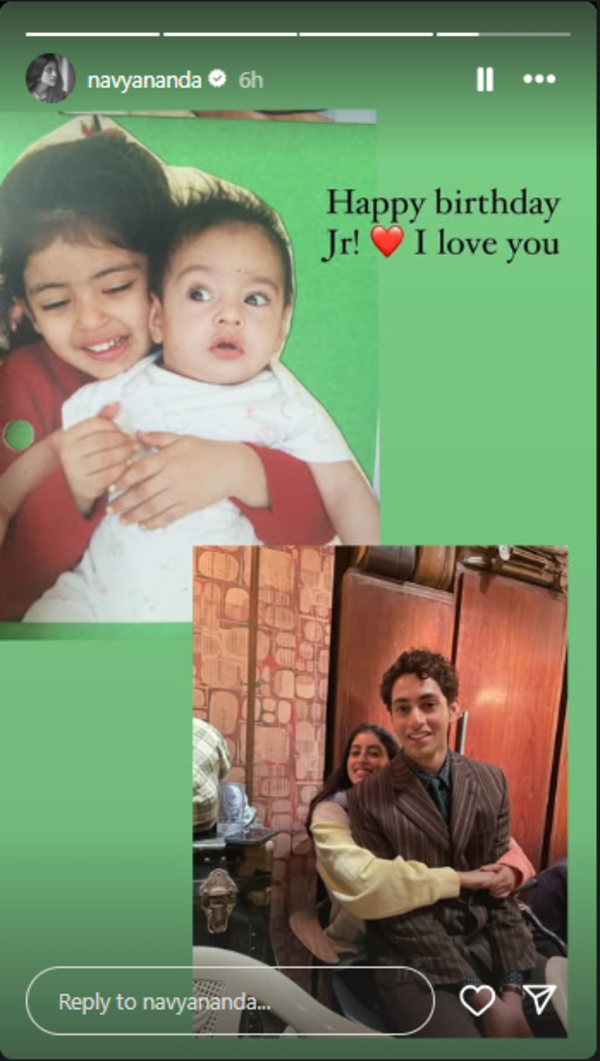
Navya Naveli Nanda also shared an adorable post for her brother Agastya, on his birthday. She posted a collage of two pictures: one from their childhood, where Navya is holding her baby brother, and another recent photo where she mimics the same pose. “Happy birthday Jr! I love you,” she wrote.

g

Suhana and Agastya made their Bollywood debut in Zoya Akhtar’s OTT film ‘The Archies’, which also featured Khushi Kapoor, Vedang Raina, Mihir Ahuja, Dot, and Yuvraj Menda. Released in 2023, this teen musical comedy is a live-action adaptation of the fictional rock band from the 1960s animated series ‘The Archie Show’, based on characters from Archie Comics.
Rumours about Suhana and Agastya dating have been circulating online for some time. They are frequently spotted together, sparking curiosity among their followers. While neither has officially confirmed their relationship, their public appearances and interactions continue to fuel speculation about their romance.
On the work front, Suhana is all set to make her big-screen debut alongside her father, Shah Rukh Khan, in the upcoming film ‘King’, directed by Sujoy Ghosh. Meanwhile, Agastya is also working on his debut, reportedly playing the lead in filmmaker Sriram Raghavan’s ‘Ekkis’, a biopic about 1971 war hero Arun Khetarpal, which will also feature Dharmendra in a key role.


Elon Musk has become the world’s richest man in history! Tesla CEO’s net worth jumps to $348 billion

0
Elon Musk has become the world’s richest man in history! Tesla CEO’s net worth jumps to 8 billion


Elon Musk has become the world’s richest man in history! Tesla CEO’s net worth jumps to $348 billion
According to the Bloomberg Billionaires Index, as of November 23, 2024, Elon Musk’s total net worth is $348 billion.

Elon Musk, the CEO of Tesla, has achieved an unprecedented personal wealth milestone, reaching $348 billion, according to the Bloomberg Billionaires Index. According to reports, with this Elon Musk has become the world’s richest man ever! Elon Musk’s wealth saw substantial growth following Tesla‘s share price increase, which coincided with Donald Trump’s electoral victory.

Assembly Election Results

According to the Bloomberg Billionaires Index, as of November 23, 2024, Elon Musk’s total net worth is $348 billion, a rise of $119 billion over the last one year.
The valuation of Elon Musk’s generative artificial intelligence company, xAI, has surged to $50 billion, an ET report quoting Wall Street Journal said, adding $13 billion to Musk’s wealth.
Tesla’s share price has increased 40% since the US election day. According to analysts, this surge reflects Wall Street’s optimistic outlook towards Tesla under Trump’s administration, particularly regarding regulations affecting self-driving vehicles.
Elon Musk’s recent support for Trump has strengthened market confidence. Following his endorsement earlier this year, Musk contributed more than $100 million to Trump’s campaign. His appointment as chair of the newly established “Department of Government Efficiency” (DOGE) places him in collaboration with biotech leader Vivek Ramaswamy.
Financial analysts anticipate that the incoming administration’s expected reduction in regulations will benefit Tesla substantially, especially regarding its Full Self-Driving technology, which has previously encountered regulatory challenges.
Discussions surrounding SpaceX‘s forthcoming funding initiative, potentially valuing the company at $250 billion, indicate that Musk’s wealth could increase by an additional $18 billion, ET reported.
Additionally, Musk’s 42% ownership in SpaceX, valued at $210 billion following a June tender offer, contributes a big chunk to his wealth. He maintains smaller investments in various ventures, including the neural technology firm Neuralink and X, previously Twitter, the social media platform.


iOS 18.2 Adds Unified ‘Default Apps’ Section to Settings App With New Categories: Report

0
iOS 18.2 Adds Unified ‘Default Apps’ Section to Settings App With New Categories: Report


iOS 18.2 is not expected to arrive until the first week of December, but we already know several details of the upcoming update, thanks to the ongoing developer beta and public beta versions. When Apple rolls out iOS 18.2 next month, users can expect to see a new unified section that allows users to set default apps for eight or more app categories, including calling, messaging, call filtering, autofill, and applications that can be used with the iPhone’s NFC chip.

iOS 18.2 Adds Ability to Set Default Apps for More Categories

Apple has added a new ‘Default Apps’ section on a recent iOS 18.2 beta release, spotted by 9to5Mac. This is a unified section in the Settings app on iOS that allows users to choose the default app to be used when a link or clicked or a specific feature (like call filtering or autofill) is used.

As of today, the ability to choose a default browser or keyboard app is located in various sections of the settings app, making it difficult for users to locate those options. With the new Default Apps section inside the settings app, Apple has introduced at least eight new categories for default apps.

 After updating to iOS 18.2, users will be able to choose a default email, browser, calling, and messaging app, allowing users to switch away from Apple’s Mail, Safari, Phone, and Messaging apps, respectively. Similarly, they will also be able to select a default call filtering app from the new Default Apps section.

Users will also reportedly see two Default App sections that allow more than one app to be selected — Contactless App and Passwords & Codes. These can be useful if a user wants to use more than one payment app or switch between more than one keyboard on their iPhone.

According to the publication, these eight Default Apps sections will be shown to users in the US, while those in other regions might see a different number of sections. iPhone users in the European Union (EU), which has more stringent anticompetition rules, might see additional options that allow them to set default apps in more categories, but there’s no clarity on those at present.